Mini Project: HTML and CSS
By Christopher Williams
Date: 8/Aug/2022
I was thinking about the best way to show off HTML and CSS and I figured that the best way is to simply show off my website!
HTML Code
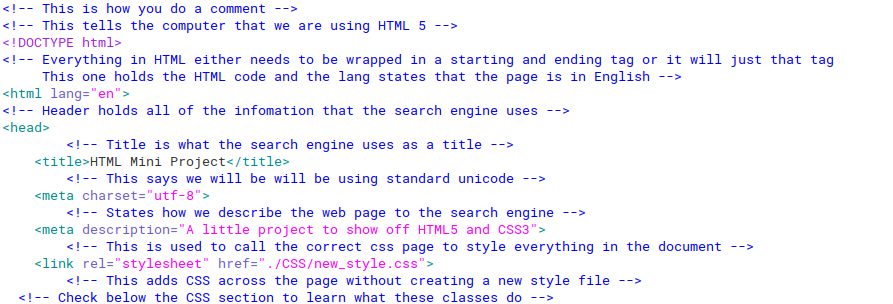
The first step is to understand a bit of HTML.
Right click the page and press "inspect" to see this page's HTML and the notes written to understand everything!
You can also download the page here and open it with your text editor of choice like notepad, notepade++ or even vim!
HTML tells your browesr how to build the page and generally works accross all browsers. If you view the HTML source, you should notice a general hierarchy in the code. We first go from the master HTML tag which gets split into the head and body tags. The head is a very small section so that branch ends there but in the body we can then further divide by sections and then the individual tags.
CSS Code
If HTML builts the page then CSS polishes that page. CSS also generally works the same accross all browesrs but be careful because different browers make the page look difrently. The most common way to use CSS is to use a style page and simply referenceing it. Another way is to use it interally in the page by including it in the source page in the heading like here. CSS also has a hierarchy where you can define a class and then put in the tags. If one tag inhierts another like nesting then the element will first take the top value and then change again by the lower level value. This also applies to pages where first the style page is used, then internal CSS then the inline CSS.
When you open up the file you will notice five different files, CSS, Downloads, Images, HTML_Mini_Project.html and index.html.
- CSS holds the style page that can be linked to every html page to add CSS to it.
- Downloads hold all of the downloads that could happen such as downloading this mini website.
- Images hold all of the images that the website uses, this also includes any icons that are being used as well.
- HTML_Mini_Project.html is this page itself.
- index.html is the home page, when you enter into a website your browser will automatically take a page named this no matter what. If you are planning on making your website remember that any page can have whatever name you want execpt the homepage which must be named index.html
Hello! :)
But, you can change a tag for just that instance like here
a sad hello :(
			footer {


				padding: .25rem;


				background-color: dimgray;


				text-align: center;


				color: white;


				flex-shrink: 0;


				}
hr { margin-right:1rem; }
			.nav-ul {


				list-style-type: none;


				margin: 0px;


				padding: 0;


				overflow: hidden;


				background-color: rgb(31 30 30);


				}
			.nav-li {


				float: left;


				padding: 0;


			}
			.nav-li-a {


				display: block;


				color: white;


				text-align: center;


				padding: 1rem 1rem;


				text-decoration: none;


				font-size: 1.5rem;


			}
.nav-li-a:hover { background-color: rgb(17 17 17); }
.h1_title { text-align: center; }
			.center_image {


				display: block;


				margin-left: auto;


				margin-right: auto;


				width: 50%;


			}